Engaging a global audience is now easier and more affordable with AI-powered voiceover tools. These tools can cut localization costs by up to 90% and reduce production time by over 80%, making them a game-changer for businesses. Whether you’re creating social media ads, corporate training videos, or e-learning content, these platforms offer solutions tailored to your needs.
Key Takeaways:
- Language Support: Tools range from 35 to 175+ languages, including regional dialects.
- Voice Quality: Realistic AI voices, voice cloning, and precise lip-syncing.
- Pricing: Options starting from free plans to enterprise subscriptions ($18–$300/month).
- Best Use Cases: Social media videos, corporate training, e-learning, and marketing campaigns.
Top Tools:
- PixelPanda: Best for short social media ads and e-commerce, supporting 35 languages.
- AI Studios: Ideal for corporate training with 150+ languages and 2,000+ avatars.
- HeyGen: Excels in lip-syncing and supports 175+ languages, including dialects.
- Synthesia: Popular for global campaigns, with 160+ languages and 1-click translation.
- Zoice: Limited information available; direct contact recommended.
- Wavel AI: Offers context-aware translations with 99.9% claimed accuracy.
- Maestra AI: Great for live transcription and dubbing in 125+ languages.
Quick Comparison:
| Tool | Language Support | Best Use Case | Pricing |
|---|---|---|---|
| PixelPanda | 35 languages | Social media and e-commerce ads | $39–$89/month |
| AI Studios | 150+ languages | Corporate training, education | $24–$55/month |
| HeyGen | 175+ languages | Marketing, outreach videos | Free, custom plans |
| Synthesia | 160+ languages | E-learning, global campaigns | $18–$89/month |
| Wavel AI | 99.9% accuracy | Dubbing, voice cloning | $30–$225/month |
| Maestra AI | 125+ languages | Live transcription, dubbing | $39+/month |
Each platform offers distinct features to suit different projects. Start with a free trial or entry-level plan to test which tool best matches your needs.
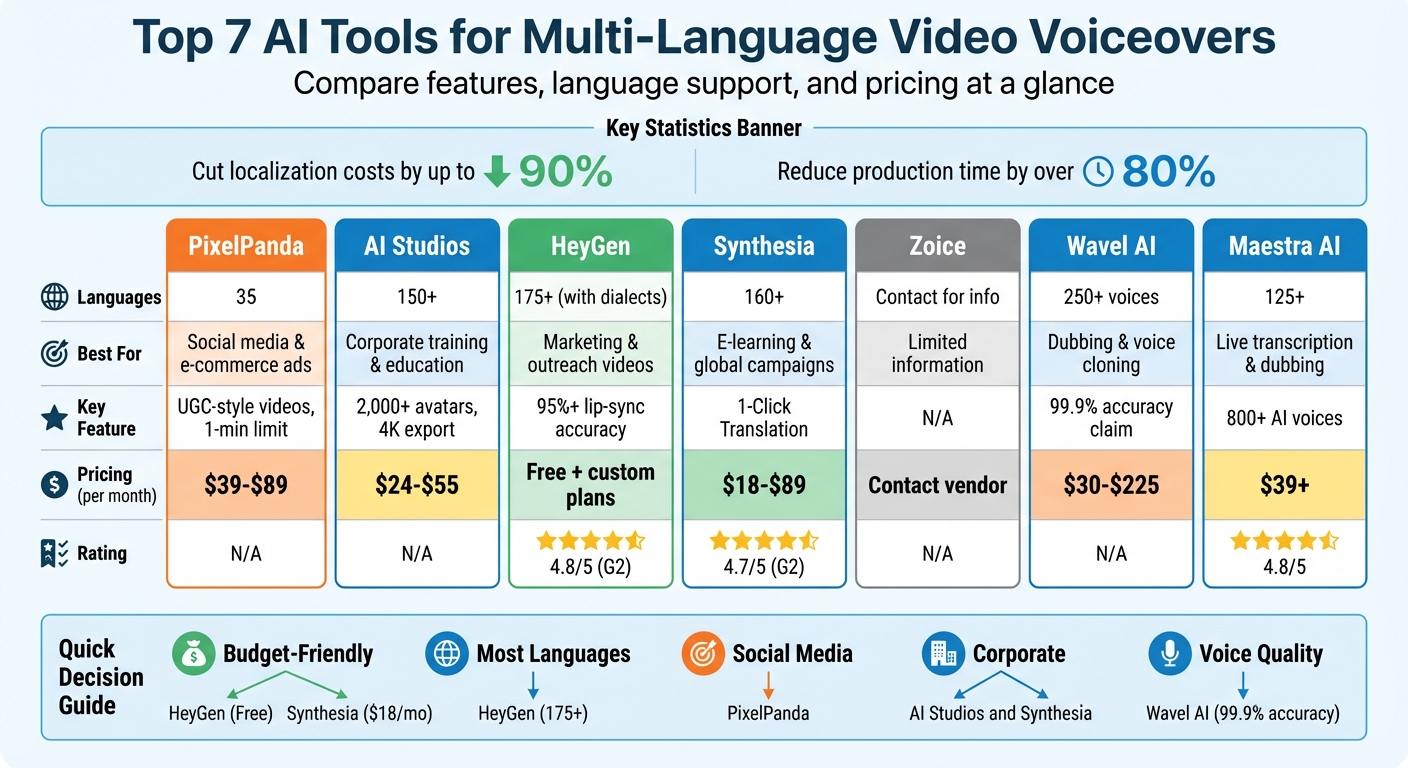
AI Video Voiceover Tools Comparison: Features, Languages & Pricing
Translate Videos into ANY Language with Same Voice (& Lip Sync!)
1. PixelPanda
PixelPanda has added multi-language video voiceovers to its toolkit. Known for its AI-generated product photos and UGC-style video ads, this platform now lets users create voiceovers directly within its video creation workflow. The addition of language options makes it a go-to for businesses aiming to localize their content.
Language Support
With support for 35 languages across all paid plans, PixelPanda caters to the localization needs of e-commerce brands and marketing teams alike.
Key Features
PixelPanda’s voiceover tools are built to work smoothly with its video production features, making it easier to create engaging, localized content. The platform also offers tools like product holding, outfit swapping, background removalixelpanda.ai/free-tools/background-remover”>background removal, and image upscalinghttps://pixelpanda.ai/free-tools/enhance-photo”>upscaling.
Videos are capped at 1 minute, making them ideal for social media ads, product demos, and promotional clips. Plus, users get commercial rights for client projects and campaigns.
Pricing
PixelPanda operates on a credit-based system with three annual subscription plans:
- Starter: $39/month (billed annually) for 7,000 credits (350 videos or 7,000 images)
- Growth: $59/month for 15,000 credits (750 videos)
- Pro: $89/month for 35,000 credits (1,750 videos)
All plans include access to 35 languages and the 1-minute video limit, ensuring flexibility for various projects.
2. AI Studios
AI Studios is a platform that supports over 150 languages, offering tools like text-to-speech, full video translation, and lip-syncing in more than 30 languages, all with native accents. This extensive language support lays the groundwork for its standout features.
Language Support
AI Studios can automatically detect, transcribe, and translate videos featuring more than 10 speakers. This makes it an excellent choice for projects like panel discussions, interviews, or training sessions, where multiple voices and languages are involved.
This advanced language capability seamlessly integrates with its impressive voice features.
Voice Quality
The platform boasts a library of over 2,000 natural-sounding voices and includes voice cloning technology that preserves the original tone and pacing of your recordings. Its Speech Duration Optimization feature ensures that translated audio aligns perfectly with video timing, even when the translated script is longer or shorter than the original, delivering accurate and natural lip-syncing.
Derrick Gandia, a public relations expert, shared, "I translate videos daily – this tool delivers near-perfect emotion and accuracy."
But voice features are just the beginning – AI Studios also includes tools for creative customization.
Key Features
AI Studios offers more than 2,000 hyper-realistic avatars and a library of 7,000 video templates. Users can export projects in stunning 4K resolution, and the platform supports SCORM format, enabling seamless integration with Learning Management Systems. Additionally, its browser-based editor makes it easy to proofread and refine translations before finalizing your project.
Pricing
AI Studios provides a free plan with limited credits, perfect for testing the platform. Paid plans begin with the Starter plan, priced between $24 and $30 per month, which includes unlimited video creation, dubbing, and 4K exports. For teams, the Team plan costs $55 per month per seat, while custom Enterprise pricing offers API access and dedicated support.
3. HeyGen
HeyGen is a platform designed to handle translations with impressive efficiency, supporting over 175 languages and dialects, and boasting over 14 million translated videos. Businesses using HeyGen have reported cutting translation costs by 80% compared to traditional methods. Its extensive language capabilities make it a strong contender for precise vocal reproduction.
Language Support
HeyGen’s language offerings include more than 175 languages, with 20+ Spanish variants (like Mexico, Spain, and Argentina), 14+ English dialects (including Australia, Canada, and Nigeria), and Chinese dialects such as Cantonese, Mandarin, and Wu. The platform also automatically detects and translates videos featuring multiple speakers, ensuring that each speaker’s unique vocal qualities are preserved.
Voice Quality
The platform’s voice cloning technology is designed to mirror the speaker’s tone, emotion, and rhythm in the translated languages. For front-facing speakers, HeyGen achieves over 95% lip-sync accuracy by aligning facial movements with the translated audio. Translation accuracy ranges between 95% and 98%, and its Dynamic Duration feature adjusts video timing to accommodate script length changes during translation.
"What I love about HeyGen is that I no longer have to say no to projects. It’s like we’ve augmented our team. We can do way more with the resources we have."
- Justin Meisinger, Program Manager, Workday
In 2025, Workday used HeyGen to localize content into 10–15 languages per project, slashing timelines from months to hours. Similarly, Trivago utilized the platform to localize TV ads for 30 markets, cutting post-production time in half and saving 3–4 months per campaign.
Key Features
HeyGen provides hyper-realistic translations with lip-sync capabilities and a quicker audio-only dubbing option. Its Brand Glossary feature ensures specific terms, like product names, remain consistent across translations. For best results, speakers should face the camera and be within 10 feet.
Pricing
The Free Plan allows translation of up to 3 videos per month, each with a maximum duration of 3 minutes, along with text-to-video features. The Enterprise Plan offers custom pricing tailored to team size and includes perks like priority rendering, API access, SAML SSO, and script proofreading for enhanced translation quality. HeyGen has earned a 4.8/5 rating on G2, based on over 900 reviews.
4. Synthesia
Used by 90% of Fortune 100 companies, Synthesia is a popular choice for 50,000 teams worldwide. It supports over 160 languages and regional variants, including Arabic, English, and Spanish, making it a versatile tool for global communication.
Language Support
Synthesia’s 1-Click Translation tool simplifies the process of converting scripts and on-screen text into more than 80 languages, available for Enterprise accounts. Its AI Dubbing feature goes further, supporting 139 languages with precise lip-syncing. The platform also offers Personal Avatars and voice cloning, creating digital twins in 29 languages, while supporting 4K video and multiple speakers for high-quality results.
Voice Quality
Synthesia excels in creating lifelike AI voices that handle nuanced pronunciations and technical terms with ease. The Phonetic Spelling tool fine-tunes pronunciations, and its voice cloning technology replicates the tone, style, and timbre of the original voice across multiple languages.
"Synthesia’s AI voiceovers sold me instantly. They give us the ability to pivot and create video content much faster than before."
- Ann Stutler, Senior Manager of Training & Learning, Division Maintenance Group
Key Features
Synthesia includes tools designed for seamless localization and user engagement:
- A Multilingual Video Player that automatically detects and adjusts to the viewer’s language.
- An AI Video Assistant that transforms documents and web links into localized video content.
- Adaptive video duration settings to tailor content for different needs.
Pricing
Synthesia offers several pricing plans to suit different users:
- Free Plan: Includes 10 minutes of video per month, access to 9 AI avatars, and support for 160+ languages.
- Starter Plan: Priced at $18/month (billed annually) or $29/month, this plan provides 125+ avatars and AI Dubbing within usage limits.
- Creator Plan: Available for $64/month (billed annually) or $89/month, offering 180+ avatars, 5 Personal Avatars, and AI Dubbing.
- Enterprise Plan: Features custom pricing, access to 240+ avatars, 1-Click Translation for over 80 languages, and unlimited Personal Avatars.
Synthesia holds a strong reputation, earning a 4.7/5 rating on G2 from over 2,000 reviews.
sbb-itb-76ad1b7
5. Zoice
Information about Zoice’s multi-language voiceover features is currently not available. For the most accurate and updated details, it’s best to reach out directly to their team. In the meantime, consider exploring other tools on this list that offer well-documented and reliable voiceover options.
6. Wavel AI
Wavel AI offers context-aware translation with an impressive claimed accuracy rate of 99.9%. Unlike basic word-for-word conversions, it captures linguistic subtleties and cultural nuances, helping bridge communication gaps across different regions. This approach makes it a versatile tool for a wide range of language needs.
Language Support
Wavel AI supports a broad spectrum of languages, including global staples like English (offering UK, US, and Indian variants), Spanish (Argentina and Mexico included), French, German, Chinese, Japanese, and Arabic. It also caters to regional languages such as Armenian, Bengali, Georgian, Khmer, Marathi, Nepali, Sinhala, Tamil, Telugu, and Vietnamese. This extensive range allows businesses to connect with both global and niche audiences.
Voice Quality
The platform boasts a collection of over 250 AI-generated voices, each offering distinct accents and styles. Whether you’re looking for commercial tones, e-learning narrations, or documentary-style voices, Wavel AI claims to deliver 99% human-like accuracy, capturing emotions and tonal shifts effectively. As Peter M., a Graphic Designer, shares:
"Its voice cloning mimics tonal nuances with precision, accurately reflecting a speaker’s modulation."
Key Features
Wavel AI’s standout features include voice cloning, which can replicate unique voices from short samples, ensuring consistent branding across languages. Its lip-sync technology aligns translated audio seamlessly with mouth movements, while the smart editor lets users tweak tone, pitch, and speed. Additionally, it offers the ability to isolate background music from speech for cleaner audio re-dubbing. Daniel Zaitzow from ContentBlocks highlights its utility:
"We use it daily to assist us in dubbing videos for our clients without needing to record a new video every time we serve a client from a different country."
Pricing
Wavel AI employs a credit-based system, where 1 credit equals 1 minute of subtitles or voiceovers, and 3 credits cover 1 minute of dubbing or video edits. The platform offers several pricing tiers:
- Free Plan: Includes 15 one-time credits with watermarks and no download options.
- Pro Plan: $40/month ($30/month with annual billing) for 300 monthly credits and 30 voice clones.
- Scale Plan: $120/month ($90/month annually) for 1,000 monthly credits and 100 voice clones.
- Generative Plan: $300/month ($225/month annually) for 3,000 monthly credits and 100 voice clones.
Annual plans offer savings of up to 33%, making it a cost-effective option for long-term users.
7. Maestra AI
Maestra AI wraps up the list, offering support for over 125 languages for dubbing, voiceovers, and lip-syncing. It boasts an impressive 4.8/5-star rating.
Language Support
Maestra AI stands out with its ability to handle voiceovers and dubbing in more than 125 languages. Its voice cloning feature covers 29 languages, making it a versatile tool for businesses aiming to connect with global and local audiences alike. Beyond that, it provides live transcription and speech-to-speech translation, enabling real-time dubbing during meetings or live events.
This broad language coverage ensures that businesses can deliver polished and accurate voice outputs across diverse markets.
Voice Quality
The platform offers a library of over 800 AI-generated voices, covering a range of accents, dialects, and emotional tones. To enhance realism, its AI-powered lip-sync generator aligns mouth movements with dubbed audio, reducing the "uncanny valley" effect often associated with synthetic voices.
Key Features
Maestra AI combines its language and voice capabilities with a text-based editor that updates dubbed audio live as scripts are modified. It integrates with popular platforms like YouTube, TikTok, Slack, Zoom, OBS, and vMix, offering seamless workflows. Additionally, it supports custom glossaries to ensure accurate translation of specialized terms and brand names. For team collaboration, the "Maestra Teams" feature allows real-time teamwork with permission-based access.
Pricing
Maestra AI provides a free trial without requiring a credit card. For live translation, its Chrome extension offers 10 minutes of free usage. Paid plans start at $39 per month, with enterprise options available for teams needing API access and centralized billing. While the basic plan covers extensive multi-language features, advanced functionalities are included in higher-tier packages.
Comparison Table
Picking the right AI voiceover tool comes down to what you need it for, your budget, and the audience you’re trying to reach. Here’s a quick comparison of some top platforms for multi-language video voiceovers:
| Tool | Language Support | Main Strengths | Best Use Case | Pricing |
|---|---|---|---|---|
| PixelPanda | 35 languages | UGC-style video ads, dynamic product showcasing, full commercial usage rights | Social media marketing (TikTok, Reels) and e-commerce videos | Starter: $39/month, Growth: $59/month, Pro: $89/month |
| AI Studios | 110+ languages (30+ for dubbing) | 2,000+ avatars, 7,000+ templates, 4K export | Corporate training, educational content, professional presentations | Starts around $20/month |
| HeyGen | 70+ languages, 175+ dialects | High-quality visuals, realistic lip-syncing, creator-friendly workflows | Marketing videos, personalized outreach, social media content | Free (first 3 minutes); paid plans for extended usage |
| Synthesia | 160+ languages | 1-Click Translation for Enterprise, extensive language library, virtual avatars | Corporate training, e-learning, global marketing campaigns | $18/month (annual) or $29/month (monthly) |
Each tool brings something unique to the table. PixelPanda stands out for its focus on social media and e-commerce, offering features tailored for dynamic and engaging content. AI Studios and Synthesia, on the other hand, are better suited for professional settings like corporate training and e-learning, thanks to their robust template and avatar libraries. If you’re looking for lifelike visuals and seamless lip-syncing, HeyGen is a solid option for marketing and outreach videos. Use this breakdown to find the tool that fits your project best.
Conclusion
Picking the right AI voiceover tool comes down to understanding your project needs. For attention-grabbing social media ads or e-commerce videos, PixelPanda stands out with its UGC-style video ads, support for 35 languages, and full commercial usage rights. On the other hand, if you’re focused on corporate training or e-learning, AI Studios and Synthesia offer features tailored to streamline content production for global teams.
These tools are designed to save both time and money, but finding the right fit requires careful consideration. Start by assessing your language needs – if you require extensive coverage, prioritize tools supporting 100+ languages. Then think about your workflow: do you need a full video creation platform or just dubbing for existing footage? Pricing matters too; some platforms charge per minute, while others offer unlimited creation with monthly plans. Matching your requirements to these factors will help narrow down your options.
A free trial or entry-level plan is a smart way to test the waters. Pay close attention to key aspects like voice quality, lip-sync precision, and how easily you can make edits. As Kristin B. from QAQF shared, "The ease of content update and cost savings are remarkable". Testing each platform ensures it aligns with your expectations.
Choose a tool that fits your current needs and budget, knowing that most platforms allow for upgrades as your projects expand. This flexibility ensures your decision today can grow alongside your audience and goals.
FAQs
How can AI voiceover tools help reduce the cost of localizing video content?
AI voiceover tools simplify localization by automating essential steps like transcription, translation, and voice generation. Traditionally, localization involves hiring voice actors, scheduling recording sessions, and coordinating with multiple vendors – an expensive and time-intensive process. With AI, you can produce natural-sounding voiceovers in various languages much faster, eliminating the need for costly reshoots or external voice talent.
These tools often include features like audio synchronization and support for multiple languages, all within a single platform. This not only streamlines workflows but also ensures consistent output across different markets. By cutting down manual tasks and speeding up production, AI voiceover technology can slash localization costs by as much as 70%, allowing businesses to expand internationally without sacrificing quality or efficiency.
What should I look for when selecting an AI tool for multi-language video voiceovers?
When selecting an AI tool for multi-language video voiceovers, there are a few important things to keep in mind to make sure it aligns with your project goals. First, take a close look at the language support and regional accents offered. This is especially important if your audience spans different regions, as a variety of accents can make your content feel more relatable and tailored.
Another critical aspect is the voice quality and realism. The top tools deliver natural, engaging voices that avoid sounding robotic or artificial. If your project includes syncing voices with visuals, you’ll also want to prioritize tools with precise lip-syncing and dubbing features, ensuring the voiceover matches seamlessly with the video.
Lastly, evaluate the pricing options to confirm they align with your budget and project size. Features like script editing or subtitle support can also be a big help, simplifying your workflow and saving time.
Can AI voiceover tools capture regional accents and support videos with multiple speakers?
Modern AI voiceover tools are built to handle regional accents and multiple speakers with surprising precision. They offer a diverse selection of voices, accents, and emotional tones, making multilingual videos feel more natural and relatable. Plus, many of these tools allow you to integrate different voices into a single project effortlessly, ensuring multiple speakers are represented in a way that feels authentic and true to the context.