Table of Contents
- Why Your Product Photography Lighting Setup Makes or Breaks Sales
- Essential Gear for a Professional Product Photography Lighting Setup
- The Three-Point Lighting Technique That Works for 90% of Products
- Three Complete Product Photography Lighting Setups Under $500
- 5 Common Lighting Mistakes That Kill Product Photo Quality
- Advanced Lighting Techniques for Specific Product Types
- How to Enhance Your Lit Photos in Post-Production
- Frequently Asked Questions
Why Your Product Photography Lighting Setup Makes or Breaks Sales

The difference between a product that sells and one that languishes in your inventory often comes down to a single factor: lighting. When shoppers can’t physically touch or examine your products, your product photography lighting setup becomes the primary tool for building trust and driving conversions. Poor lighting creates shadows that hide details, generates unflattering color casts, and makes even premium products look cheap.
Research from the Baymard Institute reveals that 56% of online shoppers cite product images as the most important factor in their purchasing decision—more influential than reviews, descriptions, or price. Yet most e-commerce sellers invest hundreds or thousands in inventory while shooting products with whatever light happens to be available in their spare room.
The good news? You don’t need a $10,000 studio to create professional product photos. With the right product photography lighting setup—one that costs under $500—you can match or exceed the quality of images from brands spending 10x more. The secret lies in understanding light behavior, not owning expensive equipment.
Before diving into specific setups, let’s address a critical point: lighting isn’t just about brightness. It’s about control. Professional product photographers manipulate light direction, intensity, and quality to reveal texture, minimize unwanted reflections, and create dimension. Once you understand these principles, even budget equipment becomes powerful.
Key Takeaway
Investing in proper lighting delivers higher ROI than any other aspect of product photography—better than cameras, lenses, or backdrops.
Essential Gear for a Professional Product Photography Lighting Setup
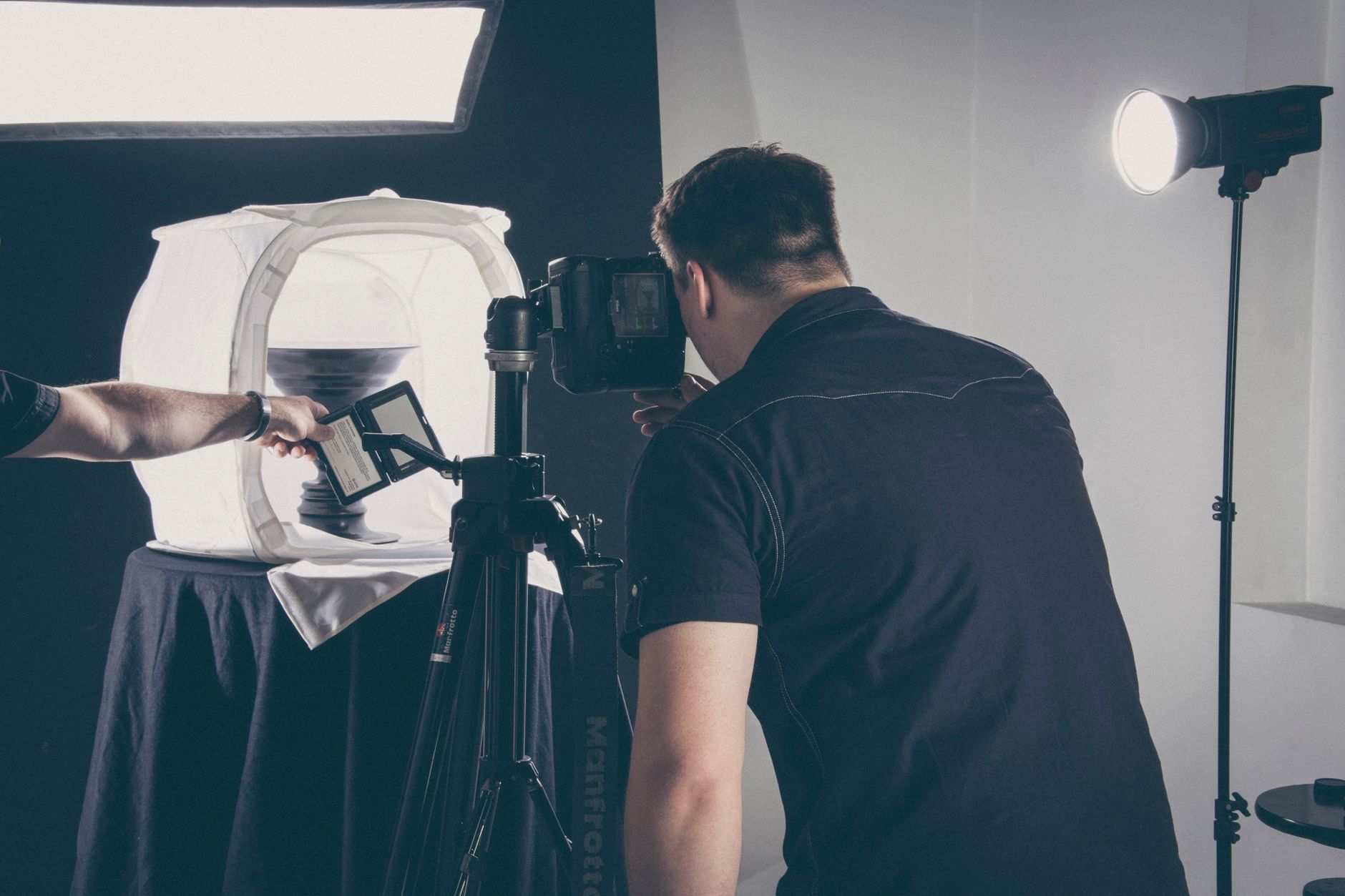
Building an effective product photography lighting setup requires understanding the core components and how they work together. While you can start with natural window light and reflectors, consistent results demand controlled artificial lighting. Here’s what you actually need versus what marketing tells you to buy.
Light Sources: Continuous vs Strobe
The first decision in any product photography lighting setup is choosing between continuous lights (always on) and strobes (flash). For e-commerce sellers, continuous LED panels offer significant advantages: you see exactly how the light affects your product in real-time, they generate minimal heat, and they’re compatible with both photo and video content.
Strobes deliver more power and freeze motion, but for stationary product photography, continuous lights provide better workflow efficiency. A quality LED panel with adjustable color temperature (3200K-5600K) gives you flexibility for different product materials and desired moods.
Light Modifiers That Actually Matter
Raw light sources create harsh shadows and unflattering highlights. Light modifiers shape and soften light to reveal product details beautifully. The three modifiers you’ll use constantly:
- Softboxes: Create diffused, even illumination perfect for most products. Larger softboxes (24″x24″ or bigger) produce softer shadows.
- Reflectors: Bounce light to fill shadows without additional light sources. White, silver, and gold surfaces each create different effects.
- Diffusion panels: Placed between light and subject to further soften harsh light, essential for reflective products.
Many beginners waste money on specialty modifiers like snoots, grids, and barn doors. Start with softboxes and reflectors—they solve 95% of lighting challenges in product photography.
Support Equipment You Can’t Skip
Even the best lights are useless without proper positioning. Invest in sturdy light stands that extend to at least 7 feet—cheap stands tip over and damage equipment. C-stands offer more stability and versatility than basic tripod-style stands, though they cost more.
A light meter isn’t essential when shooting digital (you can check exposure instantly), but a color checker card ensures accurate color reproduction across different lighting conditions. This matters enormously for products where color matching is critical—clothing, cosmetics, home decor.
Key Takeaway
The quality of your light modifiers matters more than the power of your lights—a $50 light with a good softbox beats a $300 bare bulb every time.
The Three-Point Lighting Technique That Works for 90% of Products
Three-point lighting is the foundation of professional product photography lighting setups. Originally developed for portrait and video work, this technique adapts perfectly to product photography by creating dimension, controlling shadows, and highlighting important features.
Understanding the Three Lights
The three-point lighting system uses a key light, fill light, and back light working together to create depth and visual interest. Here’s how each functions in product photography:
Your primary light source, positioned 30-45 degrees from the camera axis. This creates the main illumination and establishes the shadow pattern that gives your product dimension.
Positioned opposite the key light at lower intensity (typically 50% of key light power). Softens shadows without eliminating them completely, revealing detail in darker areas.
Placed behind and above the product, pointing toward the camera. Creates a subtle highlight along the product edges, separating it from the background and adding depth.
Adapting Three-Point Lighting for Different Products
While the basic principle remains constant, you’ll adjust the ratio between lights based on what you’re shooting. Matte products like ceramics or textiles work well with a 2:1 key-to-fill ratio. Reflective products like jewelry or electronics often need a 4:1 ratio to maintain contrast and prevent washed-out highlights.
For flat products (books, prints, clothing laid flat), you might eliminate the back light entirely and use two key lights at 45-degree angles for perfectly even illumination. This setup, called “clamshell lighting,” prevents shadows while maintaining enough directionality to show texture.
“The best product photography lighting setup is the one you can replicate consistently—consistency builds trust with customers who expect your product to look the same as your photos.”
When shooting multiple products for your e-commerce store, document your light positions with tape marks on the floor and power settings written on each light stand. This allows you to recreate the exact setup for future shoots, ensuring visual consistency across your entire catalog. Tools like AI Product Photography can help maintain this consistency even when shooting conditions vary.
Three Complete Product Photography Lighting Setups Under $500

Let’s move from theory to specific gear recommendations. These three complete product photography lighting setups each solve different needs while staying under the $500 budget. I’ve tested each configuration extensively with various product types.
Setup #1: The Starter Kit ($200-$250)
Perfect for sellers shooting small to medium products (jewelry, cosmetics, accessories, small electronics).
| Equipment | Approximate Cost | Purpose |
|---|---|---|
| 2x Neewer 660 LED panels with stands | $140 | Key and fill lights |
| 5-in-1 reflector disc (43″) | $25 | Fill shadows, add rim light |
| White foam boards (pack of 5) | $20 | Bounce cards, backgrounds |
| Photography table or sweep | $40 | Seamless background |
| Clamps and tape | $15 | Positioning modifiers |
This setup gives you adjustable bi-color LEDs (switch between warm and cool light) with enough power for products up to about 12 inches. The Neewer 660 panels are workhorses—not the highest CRI (Color Rendering Index) but perfectly adequate for e-commerce. Use one as your key light with the included diffuser, the second as fill at 50% power, and position a reflector disc behind the product for rim lighting.
Setup #2: The Professional Kit ($400-$450)
Ideal for sellers with larger products or those shooting apparel, furniture, or items requiring more power and precision.
| Equipment | Approximate Cost | Purpose |
|---|---|---|
| Godox SL-60W LED (2 units) | $220 | Key and fill lights |
| 24″x24″ softboxes (2) | $60 | Light diffusion |
| Heavy-duty light stands (2) | $70 | Support equipment |
| Westcott Scrim Jim kit (42″) | $80 | Diffusion panel |
| Gray card and color checker | $30 | Color accuracy |
The Godox SL-60W delivers 60 watts of daylight-balanced LED power with excellent color accuracy (CRI 95+). These lights accept Bowens-mount modifiers, giving you upgrade flexibility. The softboxes create beautiful, soft light that flatters most products, while the Scrim Jim provides an additional layer of diffusion for particularly challenging reflective surfaces.
Key Takeaway
The jump from $200 to $400 gear primarily buys you more power and better color accuracy—critical for fashion, cosmetics, and products where color matching matters.
Setup #3: The Hybrid Kit ($450-$500)
Best for sellers who shoot both products and lifestyle content, or those who want maximum versatility.
| Equipment | Approximate Cost | Purpose |
|---|---|---|
| Aputure Amaran 200d | $280 | Primary key light |
| Neewer 660 LED panel | $70 | Fill light |
| 32″ octabox with grid | $65 | Controlled key light |
| V-flat (white/black reversible) | $50 | Large-scale fill/flag |
| C-stand with arm | $50 | Overhead positioning |
This setup invests heavily in one premium light (the Aputure Amaran 200d offers 200W equivalent output with smartphone app control) while using a budget panel for fill. The octabox with grid gives you precise control over light spread—essential for separating products from backgrounds or creating dramatic lighting. The C-stand enables overhead positioning for flat-lay photography.
5 Common Lighting Mistakes That Kill Product Photo Quality
Even with proper equipment, most beginners make predictable mistakes that undermine their product photography lighting setup. Here are the issues I see repeatedly when auditing e-commerce sellers’ photos—and how to fix them immediately.
Mistake #1: Mixing Color Temperatures
Your eyes automatically adjust to different light colors, but cameras don’t. Mixing daylight from windows (5500K) with tungsten bulbs (3200K) creates color casts that make products look unnatural. The solution: control all light sources. Either shoot in a windowless room with artificial lights, or use daylight-balanced LEDs and block ambient light with blackout curtains.
When you must mix light sources, use gels to match color temperatures. A CTO (Color Temperature Orange) gel on daylight-balanced LEDs converts them to tungsten temperature. CTB (Color Temperature Blue) gels do the reverse. Maintaining consistent color temperature across your product catalog builds customer trust—they know the red they see in your photo matches the red they’ll receive.
Mistake #2: Positioning Lights Too Close
Beginners often place lights inches from their products, thinking more light equals better photos. This creates several problems: harsh shadows with defined edges, uneven illumination across the product surface, and blown-out highlights that lose detail. The inverse square law means light intensity decreases rapidly with distance, but it also becomes more even.
Position your key light 3-5 feet from the product as a starting point. If you need more intensity, increase the light’s power rather than moving it closer. This maintains soft, even illumination while giving you the brightness you need.
Mistake #3: Ignoring Background Separation
Products photographed directly against a background often blend into it, creating flat, lifeless images. Professional product photography lighting setups include background separation—creating visual space between the product and backdrop. This makes products appear three-dimensional and draws the viewer’s eye to the item rather than the background.
Achieve background separation by positioning your product 2-3 feet from the backdrop and adding a rim light or hair light from behind. This creates a subtle glow along the product edges. Alternatively, light your background separately at a different intensity than your product. A slightly brighter or darker background creates instant separation.
For sellers who need to remove backgrounds entirely for marketplace requirements, tools like the AI Background Remover can clean up images quickly, but starting with proper separation makes post-processing dramatically easier and faster.
Mistake #4: Over-Diffusing Light
While harsh light creates problems, over-diffused light creates different issues—flat, dimensionless images that fail to show product texture or form. This happens when photographers stack multiple diffusion layers or use enormous softboxes for small products, eliminating all shadows and contrast.
Remember: shadows aren’t your enemy. Controlled shadows reveal texture, show depth, and guide the viewer’s eye. Your product photography lighting setup should create soft shadows with gradual transitions, not eliminate shadows entirely. A good rule: if you can’t see any shadow edge at all, you’ve over-diffused.
Mistake #5: Forgetting to White Balance
Shooting in auto white balance seems convenient, but it creates inconsistent color across your product line. Your camera’s auto white balance makes different decisions for each shot based on the dominant colors in frame. A blue product might get warmer white balance compensation while a red product gets cooler treatment—resulting in different “white” backgrounds across your catalog.
Set a custom white balance using a gray card under your product photography lighting setup. Shoot the gray card filling the frame, then use that image to set custom white balance in your camera. Now every product shot under these lights will have identical color accuracy. This consistency is crucial for building a professional-looking e-commerce store.
Advanced Lighting Techniques for Specific Product Types

Once you’ve mastered basic three-point lighting, certain product categories require specialized approaches. These advanced techniques in your product photography lighting setup will solve challenges that generic lighting can’t address.
Reflective Products: Controlling Unwanted Reflections
Jewelry, watches, glassware, and electronics present unique challenges—they reflect everything in the room, including your lights, camera, and yourself. The solution isn’t brighter lights; it’s larger, more diffused light sources that create attractive reflections.
The “tent lighting” technique surrounds your product with translucent material, placing lights outside this tent. The product only reflects the smooth, white tent surface instead of individual light sources. You can buy photography tents or build one using white shower curtains and PVC pipe for under $50.
For metal products like jewelry, polarizing filters on both your lights and camera lens eliminate reflections entirely. This requires polarizing film over your light sources (about $20 per sheet) and a circular polarizer on your lens ($30-100). Rotate the camera’s polarizer while viewing through the lens until reflections disappear.
Transparent Products: Showing Glass and Liquids
Glass, liquids, and other transparent products need backlighting to show their form. Place a light behind and slightly below the product, pointing up through a white surface or diffusion panel. This creates a glowing effect that defines edges and shows transparency.
Combine backlighting with a dark background for maximum drama. The contrast between the illuminated product and dark backdrop creates striking images. Add a subtle front fill light at very low power (10-20% of your backlight intensity) to show any labels or surface details.
Textured Products: Revealing Fabric and Surface Detail
Fabric, leather, wood grain, and other textured surfaces require directional lighting to show their character. Position your key light at a 45-60 degree angle to the surface, creating shadows within the texture that reveal depth and detail.
The technique called “raking light” places your light almost parallel to the product surface, skimming across it. This extreme angle exaggerates every texture variation, perfect for showing fabric weaves, leather grain, or wood patterns. Use minimal fill light to maintain the dramatic shadow that reveals texture.
“The best product photography lighting setup adapts to your product’s specific characteristics rather than forcing every product into the same lighting pattern.”
Large Products: Lighting Furniture and Oversized Items
Furniture and large products require more powerful lights positioned farther away to maintain even illumination across the entire surface. Your $200-400 LED panels might struggle with products larger than 3-4 feet. Consider adding a third or fourth light to your product photography lighting setup for large items.
The “cross-lighting” technique positions two lights at 45-degree angles on opposite sides of large products, creating even illumination without harsh shadows. Add a top light pointing down at 45 degrees to eliminate shadows in recessed areas like chair seats or table undersides.
For sellers shipping large items, proper product photos become even more critical since customers can’t easily return oversized products. Investing in quality lighting pays off through reduced returns and increased customer confidence. Tools like AI Image Upscaler can help ensure your large product photos maintain quality when displayed at full size on product pages.
How to Enhance Your Lit Photos in Post-Production
Even perfectly lit product photos benefit from strategic post-processing. The goal isn’t to fix poor lighting—it’s to optimize already-good photos for maximum impact on e-commerce platforms. Here’s how to enhance your product photography lighting setup results in editing.
Exposure and Contrast Optimization
Start by adjusting overall exposure to ensure your background is pure white (RGB 255,255,255) if shooting on white, or appropriately exposed if using colored backgrounds. Most e-commerce platforms like Amazon require pure white backgrounds, so slight overexposure of the backdrop helps achieve this.
Increase contrast slightly (5-15% in most editing software) to make products “pop” against backgrounds. Be conservative—excessive contrast creates unnatural-looking images and can clip highlights or shadows, losing detail. Use the histogram to ensure you’re not pushing pixels to pure black or pure white except in specular highlights.
Color Correction for Accuracy
Even with custom white balance, minor color shifts happen. Use the color picker tool in Lightroom, Photoshop, or Capture One to sample your gray card from the shoot, then apply that correction across all images from that session. This ensures consistent color across your entire product line.
Pay special attention to skin tones if you shoot products in use (cosmetics, accessories, clothing). Skin tones should fall within specific ranges on the RGB color wheel—deviations look unnatural and hurt conversions. Most editing software includes skin tone indicators in their color correction tools.
Sharpening and Clarity
Apply selective sharpening to product edges and important details, but avoid over-sharpening which creates halos and artifacts. The “unsharp mask” filter in Photoshop gives precise control—start with Amount: 80-120%, Radius: 1.0-1.5 pixels, Threshold: 0-5 levels.
Clarity adjustments (increasing midtone contrast) can enhance product dimension and texture. Apply clarity globally at 10-20%, then use local adjustments to boost it further on textured areas while reducing it on smooth surfaces like glass or polished metal.
Background Cleanup and Consistency
Remove dust spots, wrinkles in backdrop paper, and other distractions using the healing brush or clone stamp. Even with a perfect product photography lighting setup, small imperfections appear. Spending 2-3 minutes per image on cleanup dramatically improves perceived quality.
For products requiring background removal, the AI Background Remover tool can handle this task in seconds, maintaining consistent results across hundreds of product images. This is particularly valuable when you need to meet marketplace requirements or create lifestyle composites.
Key Takeaway
Post-processing should enhance photos by 10-20%, not rescue them by 200%—if you’re making dramatic edits, your lighting setup needs improvement.
Batch Processing for Efficiency
Once you’ve perfected edits on one product from a session, save those settings as a preset. Apply this preset to all images shot under the same product photography lighting setup, then make minor individual adjustments as needed. This workflow processes 100 images in the time it would take to edit 10 individually.
Lightroom’s sync settings and Photoshop’s actions automate repetitive tasks. Create actions for common workflows like “resize for web, sharpen, save as JPEG” that execute with one click. Time saved on editing is time you can invest in shooting more products or optimizing your store.
For sellers managing large product catalogs, maintaining visual consistency becomes challenging. AI Product Photography tools can help standardize lighting and backgrounds across products shot at different times or locations, ensuring your catalog maintains a cohesive professional appearance.
Frequently Asked Questions
What is the best product photography lighting setup for beginners under $200?
Start with two Neewer 660 LED panels ($140), a 5-in-1 reflector disc ($25), and white foam boards ($20). This gives you adjustable key and fill lights plus versatile light modifiers. Position one LED as your key light at 45 degrees with the included diffuser, use the second at 50% power as fill from the opposite side, and position a reflector behind the product for rim lighting. This basic product photography lighting setup handles 90% of common e-commerce products effectively.
Do I need strobes or are continuous LED lights better for product photography?
Continuous LED lights are superior for most e-commerce sellers. You see exactly how light affects your product in real-time, making adjustments immediate and intuitive. LEDs generate minimal heat, work for both photos and video, and cost less than comparable strobes. Strobes offer more power and freeze motion, but unless you’re shooting moving products or need to overpower bright ambient light, LEDs provide better workflow efficiency and results for product photography.
How do I prevent reflections when photographing jewelry and other reflective products?
Use the tent lighting technique—surround your product with translucent white material and place lights outside this tent. The product reflects only the smooth tent surface instead of individual light sources. Alternatively, use polarizing filters on both your lights and camera lens. Position polarizing film over your light sources and a circular polarizer on your camera, then rotate the camera’s polarizer until reflections disappear. This technique works exceptionally well for metal products and glass.
What color temperature should I use for product photography?
Use 5500K (daylight balanced) for most products as this matches natural daylight and appears neutral to viewers. Some product categories benefit from warmer lighting—food looks more appetizing at 4500-5000K, while technical products like electronics appear more precise at 5500-6000K. The critical factor is consistency—use the same color temperature across all products in your catalog and set custom white balance in your camera to ensure accurate color reproduction.
How far should lights be positioned from products in a product photography lighting setup?
Position your main light 3-5 feet from the product as a starting point. This distance provides soft, even illumination while maintaining adequate light intensity. Lights placed too close create harsh shadows and uneven illumination. If you need more brightness, increase the light’s power rather than moving it closer. For very small products (under 3 inches), you can reduce distance to 2-3 feet. For large products, increase distance to 5-7 feet to maintain even coverage across the entire surface.
Can I use natural window light instead of artificial lights for product photography?
Natural window light works for occasional product photos but creates consistency problems for e-commerce sellers. Light quality changes throughout the day, varies with weather conditions, and differs by season. This makes it impossible to maintain consistent product photos across your catalog. If you must use window light, shoot during the same 2-hour window each day (typically 10am-12pm), use white curtains for diffusion, and position reflectors to fill shadows. For professional results, invest in a controlled artificial product photography lighting setup.
What’s the difference between a softbox and an umbrella for product photography?
Softboxes provide more directional control and less light spill than umbrellas. They create rectangular catchlights in reflective surfaces (more natural-looking than umbrella’s circular catchlights) and prevent light from bouncing around your shooting space. Umbrellas are cheaper and faster to set up but waste more light and offer less precision. For product photography, softboxes deliver superior results and justify their slightly higher cost and setup time.
How do I light products with both matte and reflective surfaces?
Products combining matte and reflective surfaces (like a phone with metal frame and matte back) require balanced lighting that doesn’t overexpose reflective areas or underexpose matte areas. Use large, diffused light sources positioned farther away to create even illumination. Add a polarizing filter to reduce reflections on metal parts while maintaining proper exposure on matte surfaces. Bracket your exposures (shoot at -1, 0, and +1 stops) then blend the best parts of each exposure in post-processing if necessary.
{
“@context”: “https://schema.org”,
“@type”: “FAQPage”,
“mainEntity”: [
{
“@type”: “Question”,
“name”: “What is the best product photography lighting setup for beginners under $200?”,
“acceptedAnswer”: {
“@type”: “Answer”,
“text”: “Start with two Neewer 660 LED panels ($140), a 5-in-1 reflector disc ($25), and white foam boards ($20). This gives you adjustable key and fill lights plus versatile light modifiers. Position one LED as your key light at 45 degrees with the included diffuser, use the second at 50% power as fill from the opposite side, and position a reflector behind the product for rim lighting. This basic product photography lighting setup handles 90% of common e-commerce products effectively.”
}
},
{
“@type”: “Question”,
“name”: “Do I need strobes or are continuous LED lights better for product photography?”,
“acceptedAnswer”: {
“@type”: “Answer”,
“text”: “Continuous LED lights are superior for most e-commerce sellers. You see exactly how light affects your product in real-time, making adjustments immediate and intuitive. LEDs generate minimal heat, work for both photos and video, and cost less than comparable strobes. Strobes offer more power and freeze motion, but unless you’re shooting moving products or need to overpower bright ambient light, LEDs provide better workflow efficiency and results for product photography.”
}
},
{
“@type”: “Question”,
“name”: “How do I prevent reflections when photographing jewelry and other reflective products?”,
“acceptedAnswer”: {
“@type”: “Answer”,
“text”: “Use the tent lighting techniqueu2014surround your product with translucent white material and place lights outside this tent. The product reflects only the smooth tent surface instead of individual light sources. Alternatively, use polarizing filters on both your lights and camera lens. Position polarizing film over your light sources and a circular polarizer on your camera, then rotate the camera’s polarizer until reflections disappear. This technique works exceptionally well for metal products and glass.”
}
},
{
“@type”: “Question”,
“name”: “What color temperature should I use for product photography?”,
“acceptedAnswer”: {
“@type”: “Answer”,
“text”: “Use 5500K (daylight balanced) for most products as this matches natural daylight and appears neutral to viewers. Some product categories benefit from warmer lightingu2014food looks more appetizing at 4500-5000K, while technical products like electronics appear more precise at 5500-6000K. The critical factor is consistencyu2014use the same color temperature across all products in your catalog and set custom white balance in your camera to ensure accurate color reproduction.”
}
},
{
“@type”: “Question”,
“name”: “How far should lights be positioned from products in a product photography lighting setup?”,
“acceptedAnswer”: {
“@type”: “Answer”,
“text”: “Position your main light 3-5 feet from the product as a starting point. This distance provides soft, even illumination while maintaining adequate light intensity. Lights placed too close create harsh shadows and uneven illumination. If you need more brightness, increase the light’s power rather than moving it closer. For very small products (under 3 inches), you can reduce distance to 2-3 feet. For large products, increase distance to 5-7 feet to maintain even coverage across the entire surface.”
}
},
{
“@type”: “Question”,
“name”: “Can I use natural window light instead of artificial lights for product photography?”,
“acceptedAnswer”: {
“@type”: “Answer”,
“text”: “Natural window light works for occasional product photos but creates consistency problems for e-commerce sellers. Light quality changes throughout the day, varies with weather conditions, and differs by season. This makes it impossible to maintain consistent product photos across your catalog. If you must use window light, shoot during the same 2-hour window each day (typically 10am-12pm), use white curtains for diffusion, and position reflectors to fill shadows. For professional results, invest in a controlled artificial product photography lighting setup.”
}
},
{
“@type”: “Question”,
“name”: “What’s the difference between a softbox and an umbrella for product photography?”,
“acceptedAnswer”: {
“@type”: “Answer”,
“text”: “Softboxes provide more directional control and less light spill than umbrellas. They create rectangular catchlights in reflective surfaces (more natural-looking than umbrella’s circular catchlights) and prevent light from bouncing around your shooting space. Umbrellas are cheaper and faster to set up but waste more light and offer less precision. For product photography, softboxes deliver superior results and justify their slightly higher cost and setup time.”
}
},
{
“@type”: “Question”,
“name”: “How do I light products with both matte and reflective surfaces?”,
“acceptedAnswer”: {
“@type”: “Answer”,
“text”: “Products combining matte and reflective surfaces (like a phone with metal frame and matte back) require balanced lighting that doesn’t overexpose reflective areas or underexpose matte areas. Use large, diffused light sources positioned farther away to create even illumination. Add a polarizing filter to reduce reflections on metal parts while maintaining proper exposure on matte surfaces. Bracket your exposures (shoot at -1, 0, and +1 stops) then blend the best parts of each exposure in post-processing if necessary.”
}
}
]
}
{“@context”: “https://schema.org”, “@type”: “Article”, “headline”: “Best Product Photography Lighting Setup for E-Commerce Sellers (Under $500)”, “description”: “Master product photography lighting setup under $500. Complete guide with equipment lists, three-point lighting techniques, and solutions for reflective products.”, “datePublished”: “2026-06-01T00:04:35+00:00”, “dateModified”: “2026-06-01T00:04:35+00:00”, “url”: “https://pixelpanda.ai/blog/product-photography-lighting-setup-under-500/”, “mainEntityOfPage”: {“@type”: “WebPage”, “@id”: “https://pixelpanda.ai/blog/product-photography-lighting-setup-under-500/”}, “keywords”: “product photography lighting setup”, “publisher”: {“@type”: “Organization”, “name”: “pixelpanda.ai”, “url”: “https://pixelpanda.ai”}}
{“@context”: “https://schema.org”, “@type”: “FAQPage”, “mainEntity”: [{“@type”: “Question”, “name”: “What is the best product photography lighting setup for beginners under $200?”, “acceptedAnswer”: {“@type”: “Answer”, “text”: “Start with two Neewer 660 LED panels ($140), a 5-in-1 reflector disc ($25), and white foam boards ($20). This gives you adjustable key and fill lights plus versatile light modifiers. Position one LED as your key light at 45 degrees with the included diffuser, use the second at 50% power as fill from the opposite side, and position a reflector behind the product for rim lighting. This basic product photography lighting setup handles 90% of common e-commerce products effectively.”}}, {“@type”: “Question”, “name”: “Do I need strobes or are continuous LED lights better for product photography?”, “acceptedAnswer”: {“@type”: “Answer”, “text”: “Continuous LED lights are superior for most e-commerce sellers. You see exactly how light affects your product in real-time, making adjustments immediate and intuitive. LEDs generate minimal heat, work for both photos and video, and cost less than comparable strobes. Strobes offer more power and freeze motion, but unless you’re shooting moving products or need to overpower bright ambient light, LEDs provide better workflow efficiency and results for product photography.”}}, {“@type”: “Question”, “name”: “How do I prevent reflections when photographing jewelry and other reflective products?”, “acceptedAnswer”: {“@type”: “Answer”, “text”: “Use the tent lighting technique—surround your product with translucent white material and place lights outside this tent. The product reflects only the smooth tent surface instead of individual light sources. Alternatively, use polarizing filters on both your lights and camera lens. Position polarizing film over your light sources and a circular polarizer on your camera, then rotate the camera’s polarizer until reflections disappear. This technique works exceptionally well for metal products and glass.”}}, {“@type”: “Question”, “name”: “What color temperature should I use for product photography?”, “acceptedAnswer”: {“@type”: “Answer”, “text”: “Use 5500K (daylight balanced) for most products as this matches natural daylight and appears neutral to viewers. Some product categories benefit from warmer lighting—food looks more appetizing at 4500-5000K, while technical products like electronics appear more precise at 5500-6000K. The critical factor is consistency—use the same color temperature across all products in your catalog and set custom white balance in your camera to ensure accurate color reproduction.”}}, {“@type”: “Question”, “name”: “How far should lights be positioned from products in a product photography lighting setup?”, “acceptedAnswer”: {“@type”: “Answer”, “text”: “Position your main light 3-5 feet from the product as a starting point. This distance provides soft, even illumination while maintaining adequate light intensity. Lights placed too close create harsh shadows and uneven illumination. If you need more brightness, increase the light’s power rather than moving it closer. For very small products (under 3 inches), you can reduce distance to 2-3 feet. For large products, increase distance to 5-7 feet to maintain even coverage across the entire surface.”}}, {“@type”: “Question”, “name”: “Can I use natural window light instead of artificial lights for product photography?”, “acceptedAnswer”: {“@type”: “Answer”, “text”: “Natural window light works for occasional product photos but creates consistency problems for e-commerce sellers. Light quality changes throughout the day, varies with weather conditions, and differs by season. This makes it impossible to maintain consistent product photos across your catalog. If you must use window light, shoot during the same 2-hour window each day (typically 10am-12pm), use white curtains for diffusion, and position reflectors to fill shadows. For professional results, invest in a controlled artificial product photography lighting setup.”}}, {“@type”: “Question”, “name”: “What’s the difference between a softbox and an umbrella for product photography?”, “acceptedAnswer”: {“@type”: “Answer”, “text”: “Softboxes provide more directional control and less light spill than umbrellas. They create rectangular catchlights in reflective surfaces (more natural-looking than umbrella’s circular catchlights) and prevent light from bouncing around your shooting space. Umbrellas are cheaper and faster to set up but waste more light and offer less precision. For product photography, softboxes deliver superior results and justify their slightly higher cost and setup time.”}}, {“@type”: “Question”, “name”: “How do I light products with both matte and reflective surfaces?”, “acceptedAnswer”: {“@type”: “Answer”, “text”: “Products combining matte and reflective surfaces (like a phone with metal frame and matte back) require balanced lighting that doesn’t overexpose reflective areas or underexpose matte areas. Use large, diffused light sources positioned farther away to create even illumination. Add a polarizing filter to reduce reflections on metal parts while maintaining proper exposure on matte surfaces. Bracket your exposures (shoot at -1, 0, and +1 stops) then blend the best parts of each exposure in post-processing if necessary.”}}]}
